
AuroraViewer manual
Rate, tag, and organize files
Ratings, Finder tags, and file moves have different storage and effects. Start with ratings and Pick/Reject for lightweight review, and use Finder tags when the classification should be visible to other Mac apps.
Ratings and Pick/Reject
- Select the current image or multiple images in the sidebar.
- Press 0–5 to set a rating.
- Press P for Pick or X for Reject.
- Use filters to narrow the results, or apply the same decision to all current filtered results.
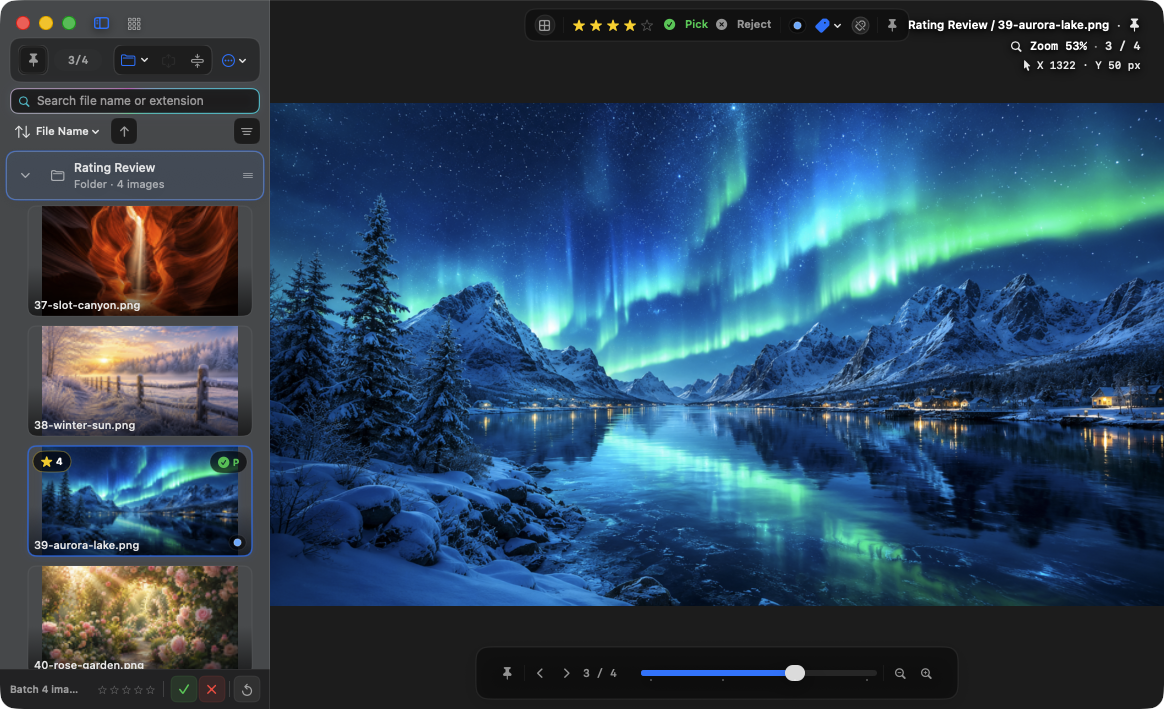
Finder color tags
- Select the images you want to tag.
- Use the top tag controls or Control-1 through Control-7 to toggle color tags.
- Use the tag filter to gather images with the same Finder tag.
- When clearing tags, confirm the selection before using Clear Tags.
Distinguish Remove from Trash
- Remove Selected from List removes the items only from the AuroraViewer library and leaves the source files intact.
- Move Selected to Trash moves the files to Finder Trash and removes successful items from the library.
- Undoing a trash operation can succeed only while the original location is available and the trashed item still exists.
- Images opened from an archive do not directly move or delete the original entry inside that archive.
Rename, move, and copy
- Rename preserves the original extension and checks for name collisions and access.
- Move updates the library path and local review record for successful files.
- Copy keeps the original in the library and does not provide an automatic delete-the-copy undo.
- Batch Export Originals adds a number to conflicting names instead of overwriting existing files.
- Undo Last Operation keeps up to 30 actions in memory; the history does not survive relaunch.